Elegant script-style characters
Instagram Font Generator
This Instagram font generator turns plain text into copy-and-paste fonts, such as 𝓬𝓾𝓻𝓼𝓲𝓿𝓮, 𝐛𝐨𝐥𝐝, ꜱᴍᴀʟʟ ᴄᴀᴘꜱ, and ⓑⓤⓑⓑⓛⓔ, for your Instagram name, bio, captions, comments, and Story text. Each letter is a Unicode character, not a font file, so it pastes into the app on iPhone and Android with nothing to install.
Instagram has no font setting for your profile or captions. Bios and captions show in your phone's system font, and only Story and Reels text has a built-in font picker. Pasting styled Unicode is the only way to change how your profile text looks. This page helps you pick a style for each part of Instagram, and the fancy text generator has every style at once. For bio ideas and the full list of field limits, see aesthetic fonts for your Instagram bio.
Last updated
Unicode text converter
Instagram Font Generator.
Type once, compare every style, then copy the result you want.
2 Choose an output · 29 stylesClick any output to copy
Compact, even, and highly readable
Raised miniature letters and numbers
Low-set characters for notes and formulas
Strong mathematical Unicode lettering
Clean sans-serif bold for posts and headers
A clean editorial slant
Expressive and high-impact
Heavier script letters with no gaps
Technical, measured letterforms
Outlined mathematical lettering
Heavy blackletter with a complete alphabet
Sharp blackletter forms
Soft circled letters and numbers
Solid black circled capitals and numbers
Bold enclosed capitals
Airy arcade-style characters
Full-width letters with extra-wide ideographic spaces
Portable combining underline
A line through every character
Give every character more room
Flip and reverse the whole line
Flip each letter left-to-right, like a reflection
Read the phrase from right to left
A bright social-ready frame
A warm decorative frame
Clean full-width bookends
A restrained corrupted-text effect
Blank Unicode characters that copy and paste like empty space
Every style, converted at once.
Cursive𝒮𝒶𝓂𝓅𝓁ℯSmall capsꜱᴀᴍᴘʟᴇBold𝐒𝐚𝐦𝐩𝐥𝐞Italic𝑆𝑎𝑚𝑝𝑙𝑒
Bold cursive𝓢𝓪𝓶𝓹𝓵𝓮
Double struck𝕊𝕒𝕞𝕡𝕝𝕖
BubbleⓈⓐⓜⓟⓛⓔFull widthSample
Sparkles✦ Sample ✦
Copy and paste in four steps.
Type your name, a bio line, or a caption into the box below.
Compare Cursive first, then Small caps, Bold, and Italic. These stay readable on a small phone screen.
Copy the style you want with one tap.
In Instagram, tap Edit profile and paste it into Name or Bio, or paste it into a caption, comment, or Story text box. Check how it looks before you save, because you can only change your name twice within 14 days.
Built for real places you paste text.
Name
The bold line above your bio. It's up to 30 characters, you can change it twice within 14 days, and it's searchable. Keep the word people search for in plain letters and style the rest, like Maya Lin | ᴄᴇʀᴀᴍɪᴄꜱ.
Bio
Your bio has 150 characters. Small caps and cursive suit short bio lines, and one bold line works as a header above them.
Captions & comments
Captions can be up to 2,200 characters, but only the first line or two show before "… more". Style the opening line so it catches the eye, and keep the rest plain.
Stories, Reels & Notes
Paste styled text into the Story or Reels text tool, or into a 60-character Note, to get looks Instagram's own font picker doesn't have, like small caps or bubble letters.
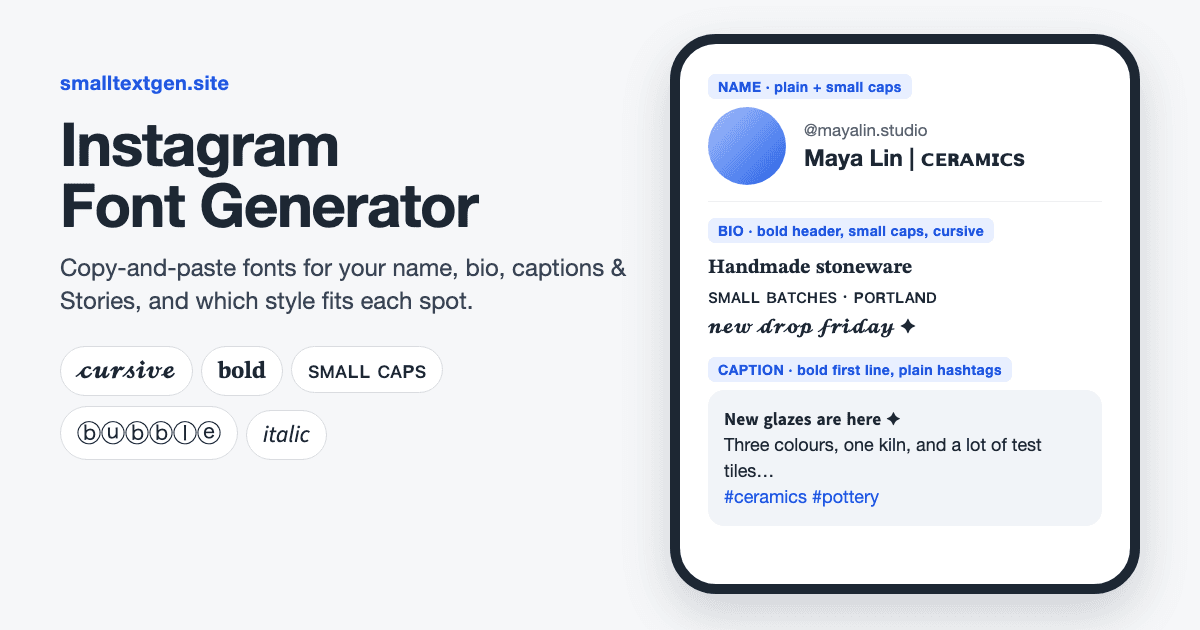
Which Instagram font should you use where?
Use bold or small caps for your name, small caps or cursive for your bio, and bold for the first line of a caption. These styles stay readable at small sizes and show up on almost every phone. Save bubble, gothic, and vaporwave letters for a single accent word.
Bold and small caps come from Unicode blocks that almost every phone font covers. Script, fraktur, and double-struck letters come from the Mathematical Alphanumeric Symbols block (U+1D400–U+1D7FF), which some older Android phones don't fully support, so a few followers may see empty boxes instead.
| Where | Best styles | Why it works | Avoid |
|---|---|---|---|
| Name | Bold, small caps | Bold matches the name's heavy weight, and small caps keeps it neat | Styling the part people search for |
| Bio header line | Bold, bold cursive | Reads like a heading above plain lines | Styling every line |
| Bio body | Small caps, cursive, italic | Light and easy to read at bio size | Zalgo and upside-down text |
| Caption opening line | Bold, bold sans | Catches the eye before "… more" | Styling the whole caption |
| Comments | Bold, italic | A quick highlight in a reply | Long styled comments, which can look like spam |
| Story & Reels text | Small caps, bubble, vaporwave | Looks the built-in font picker doesn't offer | Thin styles over busy photos |
Will a fancy font stop people finding you on Instagram?
It can, if you style the words people search for. Instagram search matches the letters in your name field, and 𝐌𝐚𝐲𝐚 is made of different characters from Maya, so a fully styled name may not show up when someone types your name.
Keep your real name or your main keyword plain and style an add-on next to it. Maya Lin | ᴄᴇʀᴀᴍɪᴄꜱ is easy to find and still looks styled. The same goes for captions, where plain keywords help Instagram understand what a post is about.
Do styled hashtags work?
No. A hashtag only links to posts that use exactly the same characters, and #𝐭𝐫𝐚𝐯𝐞𝐥 is not #travel. A styled hashtag either won't link at all or leads to an almost empty tag, so keep hashtags in plain letters even inside a styled caption.
Can screen readers read styled text?
Not reliably. Screen readers may read styled letters one at a time, read out their Unicode names, or skip them. Keep anything important, like your name, contact details, and calls to action, in plain text.
Instagram's own fonts vs copy-and-paste fonts
Instagram's built-in fonts only work in Story and Reels text, while copy-and-paste fonts work everywhere you can type except your @username. Your username only allows letters, numbers, periods, and underscores.
Use the built-in picker when you want an effect like Neon's glow. Paste Unicode when you want a look the picker doesn't have, or one that matches your bio.
| Feature | Instagram's built-in fonts | Copy-and-paste fonts |
|---|---|---|
| Where they work | Story and Reels text only | Name, bio, captions, comments, Stories, Reels, Notes, and DMs |
| How you choose one | The font button in the text tool | Copy from a generator and paste |
| What followers see | The same font on every phone | The same characters, drawn in each phone's own font |
| Example styles | Classic, Modern, Neon, Typewriter | Cursive, bold, small caps, bubble, gothic |
| Works outside Instagram | No | Yes, anywhere Unicode text is accepted |
FAQ
Frequently asked questions
01What is an Instagram font generator?+
It's a tool that turns normal letters into look-alike Unicode characters, like cursive, bold, or small caps, that you can paste into Instagram. Instagram shows them like any other text, so you don't need an app or a font download.
02Are Instagram fonts real fonts?+
No. They're Unicode characters that look styled, not font files. Each phone draws them with its own fonts, which is why the same text can look slightly different on an iPhone and an Android phone. Unicode, explained covers how this works.
03Is this Instagram font generator free?+
Yes. It's free, with no sign-up and no limit. The text converts in your browser, so what you type isn't uploaded.
04Why won't Instagram let me save my styled name?+
Usually because you've already changed your name twice in the last 14 days, which is Instagram's limit. If you pasted the text into the Username field instead, it will be rejected, because usernames only allow letters, numbers, periods, and underscores.
05Do styled hashtags work on Instagram?+
No. A hashtag only links to posts with exactly the same characters, so #𝐭𝐫𝐚𝐯𝐞𝐥 doesn't count as #travel. Keep hashtags in plain letters.
06Why do some letters show as boxes after I paste?+
The viewer's phone has no glyph for that character. Script, gothic, and double-struck letters are the most likely to break on older Android phones, while bold and small caps are the safest. Some styles also leave out letters Unicode never added, like a small-caps X, so those letters stay plain.
07How do I make text bold in an Instagram caption?+
Instagram has no bold button, so type your line into the generator, copy the Bold style, and paste it into the caption. Bold one opening line rather than the whole caption, which is harder to read.
08Can I use these fonts on TikTok, Facebook, and Threads?+
Yes. They're standard Unicode, so they paste into TikTok, Facebook, Threads, X, and most other apps. Each app has its own limits. See fonts for TikTok for what works there.
09Does a fancy font look the same on a computer?+
Mostly. The characters are the same, but Instagram on the web uses your computer's fonts, so letters may look a little thinner or wider. Rare styles can show as boxes on older computers.
10How do I make my Instagram name stand out without hurting search?+
Keep your real name or main keyword in plain letters and style a short add-on next to it, like Maya Lin | ᴄᴇʀᴀᴍɪᴄꜱ. A divider such as | or ✦ separates the two parts. You stay easy to find, and the name still looks styled.