Fortnite name symbols are Unicode characters, such as ★, ツ, 彡, ♛, and 【】, that you paste into your Epic Games display name to decorate it. Epic doesn't publish a list of allowed symbols. Stars, Japanese characters, brackets, and superscript letters usually pass its filter, while emoji are removed.
Your Fortnite name is your Epic Games display name, so every symbol has to get past Epic's name filter and fit within 3–16 characters. You can only change it once every two weeks, so it pays to pick a symbol that's likely to work before you save. To restyle the letters themselves, use the Fortnite font generator, and for other games, the gaming font generator. This guide covers the symbols that go around them.
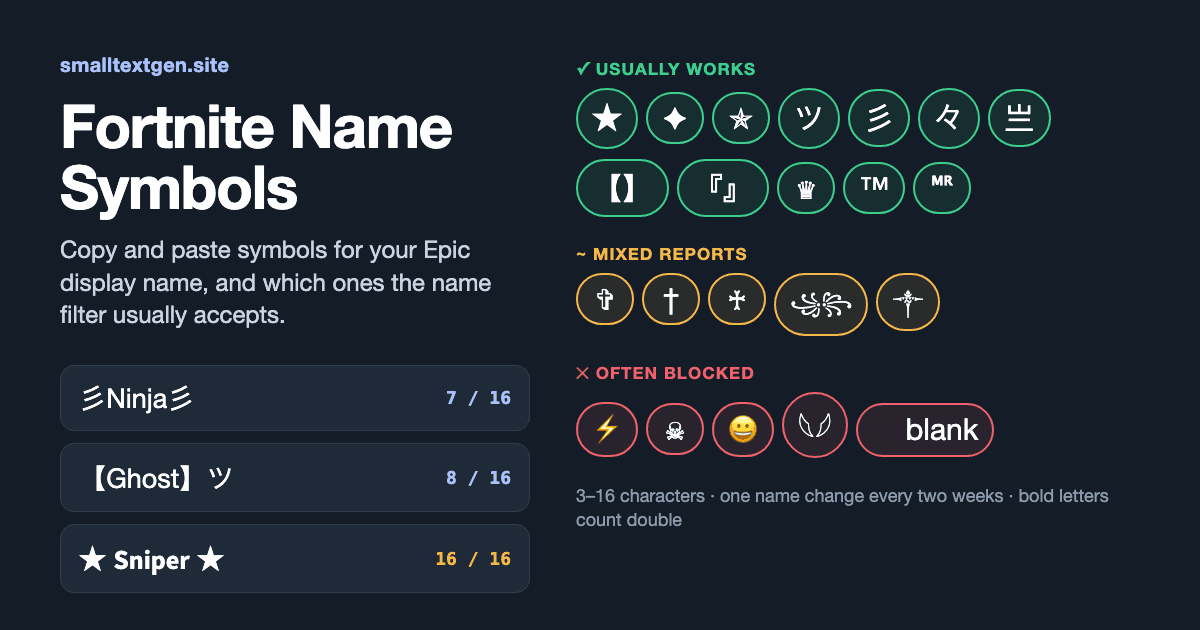
Which symbols work in a Fortnite name?
Plain letters, numbers, spaces, hyphens, and underscores always work. Decorative symbols are hit or miss. Player-tested lists from 2026 agree that simple stars, Japanese katakana like ツ, CJK brackets, and small superscript letters usually pass. Colour emoji are stripped, and blank or invisible names are rejected.
The table groups the symbols that show up most in Fortnite names, with how often player lists report them passing as of October 2026. "Usually works" means at least two independent lists include the symbol. "Mixed" means reports disagree. Epic can change its filter at any time, so treat this as a guide, not a guarantee.
⚡, ☠, and ⚔ have emoji versions, and ⚡ shows as a colour emoji by default on most phones. That's why Epic's emoji filter often catches them. Pick ★ or ✦ if you want a symbol that's less likely to be removed.
| Symbol set | Copy | Unicode | Counts as | Status |
|---|---|---|---|---|
| Stars | ★ ☆ ✦ ✧ ✪ ✯ | U+2605, U+2606, U+2726, U+2727, U+272A, U+272F | 1 each | Usually works |
| Japanese characters | ツ シ 々 彡 乡 亗 | U+30C4, U+30B7, U+3005, U+5F61, U+4E61, U+4E97 | 1 each | Usually works |
| Brackets | 【 】 『 』 「 」 | U+3010–3011, U+300E–300F, U+300C–300D | 1 each | Usually works |
| Crowns & trademark | ♛ ♕ ♔ ™ | U+265B, U+2655, U+2654, U+2122 | 1 each | Usually works |
| Superscript letters | ᴹ ᴿ ⁿ ᵗ ᵛ | U+1D39, U+1D3F, U+207F, U+1D57, U+1D5B | 1 each | Usually works |
| Crosses & daggers | ✞ † ♰ | U+271E, U+2020, U+2670 | 1 each | Mixed |
| Javanese "wings" | ꧁ ꧂ ༒ | U+A9C1, U+A9C2, U+0F12 | 1 each | Mixed |
| Emoji-style symbols | ⚡ ☠ ⚔ | U+26A1, U+2620, U+2694 | 1 each | Often stripped |
| Hieroglyph wings | 𓆩 𓆪 | U+131A9, U+131AA | 2 each | Often boxes |
| Invisible filler | ㅤ | U+3164 | 1 | Usually rejected as blank |
What does ツ mean in a Fortnite name?
ツ is the Japanese katakana letter "tsu" (U+30C4). It's popular because it looks like a small smiling face, the same face in the ¯\_(ツ)_/¯ shrug. In names it's just decoration. It doesn't mean anything to other players beyond the look.
What are "sweaty" Fortnite symbols?
"Sweaty" is Fortnite slang for a player who tries extremely hard. Sweaty names often use sharp, compact symbols like 彡, 亗, 々, ×, and ϟ, or a pair of brackets around a short tag. They signal style, not skill, and they follow the same filter rules as any other symbol.
How do you put symbols in your Fortnite name?
Change your Epic Games display name on the Epic website, not inside the game. Copy the symbol first, then paste it into the display name field in your account settings.
1. Copy a symbol from the table above, or build the full name in the Fortnite font generator and add a symbol at each end.
2. Sign in at epicgames.com on a phone or computer browser and open Account settings.
3. Click the pencil icon next to your display name.
4. Paste the name with your symbol. Keep the whole name between 3 and 16 characters.
5. Confirm the change. If Epic says the name isn't allowed, swap the symbol for a plainer one from the "Usually works" rows and try again.
6. Restart Fortnite so the new name loads. It can take a little while to show for everyone.
Use a browser, not a console, for this. A controller can't type most symbols, and pasting works best on a computer or phone.
Why did Epic reject your Fortnite name symbol?
Most rejections come from Epic's filter, which blocks characters it can't read or that could be used to fake another name. The rest come from Epic's written name rules, the length limit, or the two-week cooldown.
The filter blocked the character
Epic doesn't publish which Unicode characters it accepts. It removes colour emoji and rejects many look-alike letters, combining marks, and blank characters, because they can be used to copy someone else's name. If one symbol fails, try a simpler one in the same style, like ★ instead of ⚡.
The name breaks Epic's rules
Epic's display name rules ban vulgarity, hate speech, and offensive language. They also ban direct references to any Epic Games employee, product, service, or character, and private details like phone numbers, addresses, and real names. A symbol doesn't make a banned word allowed, and Epic can reset a name that breaks these rules.
The name is too long or too short
A display name must be 3–16 characters. Symbols count toward that limit, and some count double. More on that below.
You're still in the cooldown
You can change your Epic display name once every two weeks. If the pencil icon is locked, hover over the info icon to see when you last changed it. Player reports suggest a rejected attempt doesn't start the cooldown, because only a saved change does. A saved name that turns out to show as boxes still costs you two weeks, though.
How do symbols count toward the 16-character limit?
Most symbols count as one character, but characters from outside Unicode's Basic Multilingual Plane are stored as two code units, and many apps count them as two. That includes styled bold and gothic letters and the 𓆩𓆪 hieroglyph wings. Epic doesn't publish how it counts, so plan around the stricter count.
The last name in the table looks like 10 characters but uses all 16 code units, because each bold letter takes two. If a styled name won't fit, keep the letters plain and let one or two symbols do the decorating.
| Name | Looks like | Code units |
|---|---|---|
| 彡Ninja彡 | 7 characters | 7 |
| 【Ghost】ツ | 8 characters | 8 |
| ᴹᴿ Shadow | 9 characters | 9 |
| ★ Sniper ★ | 10 characters | 10 |
| 𓆩Raven𓆪 | 7 characters | 9 |
| ★ 𝗦𝗻𝗶𝗽𝗲𝗿 ★ | 10 characters | 16 |
Do symbols in your Fortnite name show on PlayStation and Xbox?
Not always. Players on PC, mobile, and Nintendo Switch see your Epic display name, symbols included. Players on the same PlayStation or Xbox as you usually see your PSN ID or Xbox gamertag instead, and those have their own rules for symbols.
To change what console friends see, you'd change your PSN online ID or Xbox gamertag. Both platforms give one free change, and later changes usually cost around $10 each (2026 pricing; check your platform's store). Cross-platform lobbies show the Epic name, so your symbol still appears to most of the players you meet.
Ready-made Fortnite name patterns
These patterns use symbols from the "Usually works" rows. Replace NAME with your own name and check the total stays within 16 characters.
One symbol at each end looks cleaner than a name packed with symbols. It's also less likely to get caught by the filter and easier for friends to search for.
| Pattern | Example |
|---|---|
| 彡NAME彡 | 彡Ninja彡 |
| 【NAME】 | 【Ghost】 |
| NAMEツ | Viperツ |
| ᴹᴿ NAME | ᴹᴿ Shadow |
| ★NAME★ | ★Nova★ |
| 『NAME』 | 『Echo』 |
| 々NAME々 | 々Blaze々 |
| NAME™ | Frost™ |
Are Fortnite name symbol sites safe?
Copying a symbol from a web page is safe, because it's just text. The risk is a site or extension that asks you to sign in with your Epic account to "apply" a name for you. No site needs your Epic password to give you a symbol. Change your name only on epicgames.com.